Private AI email client for macOS

Your inbox, triaged.
Nothing sent without you.

Terse sorts every new message into what to do next, drafts replies in your own voice, and remembers what you know about the people who write to you. It runs on your Mac with the accounts you already have: Gmail directly, and Exchange, iCloud, or anything else through Apple Mail. It never presses Send.

macOS 13 or laterWorks with your existing accountsBring your own AI subscription or key

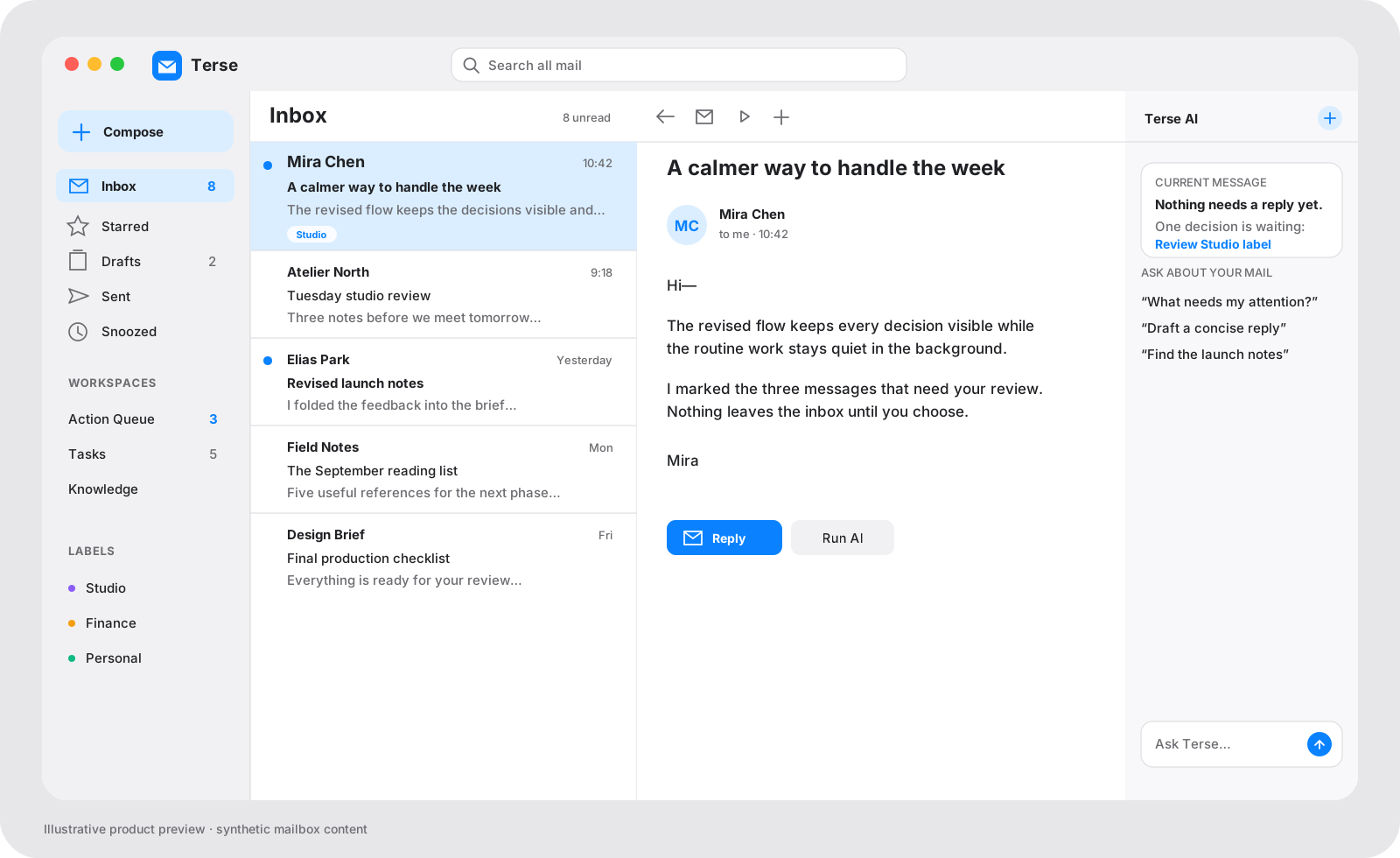
The Terse workspace: the mailbox sidebar, an inbox with triage counts above the list, an AI reply suggestion open in the reader, and the AI Chat panel showing the sender's Context card
The Terse workspace with the AI Chat panel open: triage counts above the list, a suggested reply in the reader, and the sender’s Context card on the right. Synthetic mailbox content.

Seven actions. One key.

Every new message is classified as Reply, Move, Meeting, Workflow, Forward, Delete, or Archive. The counts sit above your list, so the day starts with what needs you rather than what arrived. Open a card, read the reasoning, fix the draft if you want, press Enter. Cmd+Z takes it back.

The inbox list with seven triage-count buttons above it, beside a reader showing an AI reply suggestion with an embedded draft and a Send button
  • Drafts in your voiceReply rules you edit, plus the way you actually write to that one person, learned from your sent mail.
  • Meetings checked firstA Meeting card opens Apple Calendar at the proposed time before you accept, and drafts an alternative if it clashes.
  • Never automaticSend, Delete, and Forward always wait for a person. Filters can only automate reversible actions like labels and Archive.

Know who you’re writing to, before you write.

Open a message and the Context panel shows what Terse has learned about the sender from your own mail: their role, open requests, decisions you made together, shared projects, and how the two of you usually speak. Reviewed facts only, each one traceable to the email it came from. Ask about your mail from the same panel.

  • Person or ProjectSwitch between the sender’s card and the project this thread belongs to. Both stay in view while you read and reply.
  • Gather on demandBuild a card from up to 50 direct emails with that person. Group conversations are optional and off by default.
  • Yours to editKeep, correct, or forget any fact. AI Chat answers from reviewed knowledge first and shows the emails it used.
The AI Chat panel: a Context card for the sender with reviewed facts and a Gather control, above a conversation that lists the emails it used
The AI Chat panel, 360 px wide as in the app. Context on top, conversation below.

A memory of your relationships, built from your own mail.

Personal Knowledge turns your conversations into a reviewable overview of people, projects, requests, and commitments. It is off until you switch it on, it estimates coverage and cost before it starts, and everything it learns lives in a local database on your Mac.

  • Relationship overview
  • Shared projects and topics
  • Important decisions
  • Open requests and commitments
  • Recent interaction timeline
  • Tone and communication preferences

Every profile has these sections. An optional Obsidian export writes them as Markdown when you ask.

The Knowledge workspace on the People tab: a list of people on the left and a profile on the right with relationship overview, shared projects, decisions, open requests, knowledge to validate, and communication preferences
Knowledge → People. Pending suggestions wait for your Keep or Discard; nothing enters a profile unreviewed.

Works with the mail you already have.

Terse builds on Apple Mail, so every account Mail already knows is there on day one, Exchange and iCloud included. Gmail can also connect directly through the Gmail API, so Snooze, Send Later, and labels keep working when Mail is closed.

  • Apple Mail DefaultEvery account Mail already has, including Exchange and iCloud, with its folders, flags, and signatures.
  • GmailDirect Gmail API connection. Google handles sign-in; the refresh token stays in your Keychain.
  • Exchange Through Apple MailFolders, flags, Archive, and Snooze use the Exchange mailboxes Mail already syncs.
  • Outlook.com & Microsoft 365 BetaDirect Microsoft Graph connection for accounts you do not keep in Apple Mail.
  • Yahoo MailYahoo’s TLS mail servers with a Yahoo app password.
  • Any IMAP/SMTPTLS only: IMAP 993 and SMTP 465 or STARTTLS 587. Passwords stay in Keychain.
Settings → Accounts: Apple Mail accounts managed in place, and direct connection cards for Gmail, Outlook, Yahoo, and IMAP
Settings → Accounts. Apple Mail accounts are managed in place; direct connections sign in with the provider.

Pick the model for each job. Or none.

Use the ChatGPT or Claude subscription you already pay for, or a Z.AI key. Choose one model for writing and one for extracting facts, then fine-tune all six tasks, reasoning effort included. Only the bounded prompt for the task you triggered leaves your Mac, and no AI feature runs until you turn it on.

  • OpenAIChatGPT subscription through the Codex CLI
  • AnthropicClaude subscription through the Claude CLI
  • Z.AIAPI key, kept in Keychain

Six tasks to assign: Triage + Run AI, AI Chat, AI Draft, Agent Session, Label Discovery, Personal Knowledge.

Settings → AI Models: two role cards for drafting and extraction, per-task model and reasoning choices, and provider connection status
Settings → AI Models. Two role cards cover the common case; Customize by task sets model, reasoning effort, and speed per task.

Still a complete mail client.

Everything you expect from a Mac mail app, with the parts that usually need a cloud service done locally instead.

  • One search fieldPlain words search the mailbox you are in. from:, has:attachment, after:2026-07-01, OR, and parentheses search everything. Save a search and show it as its own inbox.
  • Labels that don’t move mailColored, nested labels that live in Terse, several per message. Label discovery proposes a taxonomy from your own history and marks the ones you already have.
  • Filters that start in ReviewRules use the same search syntax, run before AI, and can only be switched to automatic for reversible actions.
  • Snooze, Follow Up, Send LaterSchedules survive restarts. The Outbox shows exactly what is waiting, what was handed to Mail, and what needs a second look.
  • Sign and return PDFsAdd a signature, initials, dates, and checkmarks to an attachment, then reply with the edited copy. The original stays unchanged.
  • Templates and signaturesGlobal or per-account templates with recipient and subject variables, plus your native Apple Mail signatures.
  • Vacation responderPer account, with dates, time zone, and a contacts-only option. At most one reply per sender every four days.
  • On your phone tooAn installable web app served by the same local service, with swipe actions you configure and the same triage queue.
I

Local by design

Indexes, preferences, and knowledge live in a database on your Mac. OAuth tokens and API keys live in macOS Keychain. There is no Terse account and no Terse cloud.

II

No ads, no data sale

Your email is never used to target advertising and is never sold. Google user data is used only to show and organize your mail and carry out the actions you choose.

III

No automatic sending

AI, filters, and agents cannot press Send, Delete, or Forward. They prepare; a person decides. Even automatic filters are limited to reversible actions.

Your whole inbox.
Still yours.

See exactly what Terse accesses, why it is needed, and how to revoke it. Disconnect an account, revoke access, and remove local data whenever you choose.